
On-Site AI Transcriptions & Translations
Clevercast lets event organizers provide on-site audiences with real-time AI-generated transcripts and speech translations. Participants can follow live speech as scrolling text, either in its original language or translated. Transcripts can be displayed on large screens or accessed on personal smartphones, while those who prefer to listen can tune in to AI-generated speech translations using their smartphone and headphones.
What is Clevercast On-Site used for?
Clevercast On-Site makes live events more accessible and inclusive by turning speech into real-time text and audio translations. Supporting multiple speakers and spoken languages, it works seamlessly across smartphones, tablets, laptops and venue screens. Participants simply open the web application in their browser – no downloads or installation required.

Live Transcripts on Venue Screens
Make every word visible. Display scrolling, real-time transcripts on large screens throughout the venue, allowing attendees to read along as speakers present.

Real-Time Audio Translations
Break down language barriers with live AI voice translations. Participants can listen to the speaker in their preferred language, using their smartphone and headphones.

Live Transcripts on Personal Devices
Put live transcripts in everyone’s hands. Participants can follow the speech on their own smartphone, tablet or laptop, in the original language or one of several translations.

Access for Remote Participants
Extend the experience beyond the venue. Remote speakers and online participants can also access live transcripts and audio translations, wherever they are in the world.
How does it work?
From live audio to real-time transcripts and translations. Clevercast makes it easy to bring AI-powered speech recognition and translation to your event.
1. Send your audio to Clevercast
Connect your audio source in minutes
Create an event in Clevercast and send your audio feed directly to our platform. The easiest way is through a secure WebRTC connection from your browser – no additional configuration required. For more advanced setups, SRT and RTMP are also supported, including redundant broadcasting.
2. Let AI do the work
Turn spoken words into live transcripts and translations
Clevercast’s AI engine converts speech into text in real-time, with optional translations in multiple languages. Custom vocabularies improve accuracy, while automatic speaker detection helps identify who is speaking. Translations can also be delivered as natural-sounding AI voices, with a distinct voice for each speaker.
3. Reach your audience
Give every participant access in their preferred language
Participants simply scan a QR code or open a secure event link in their browser – no app installation required. They can follow live transcripts, listen to AI-generated audio translations, or combine both. Dedicated language links make it easy to give everyone direct access to the right language.
![]() Read, Listen, Choose
One app. Two experiences. Every language.
The Clevercast On-Site web app makes live transcripts and audio translations instantly accessible to everyone at your event.
For producers, dedicated links provide automatically scrolling transcripts that can be displayed on large venue screens.
For participants, an intuitive interface lets them read live transcripts, listen to AI-powered audio translations, or combine both. They can choose their preferred languages and switch between them at any time.
The application works on smartphones, tablets and laptops, across all modern browsers. No app to install – simply open a link or scan a QR code.
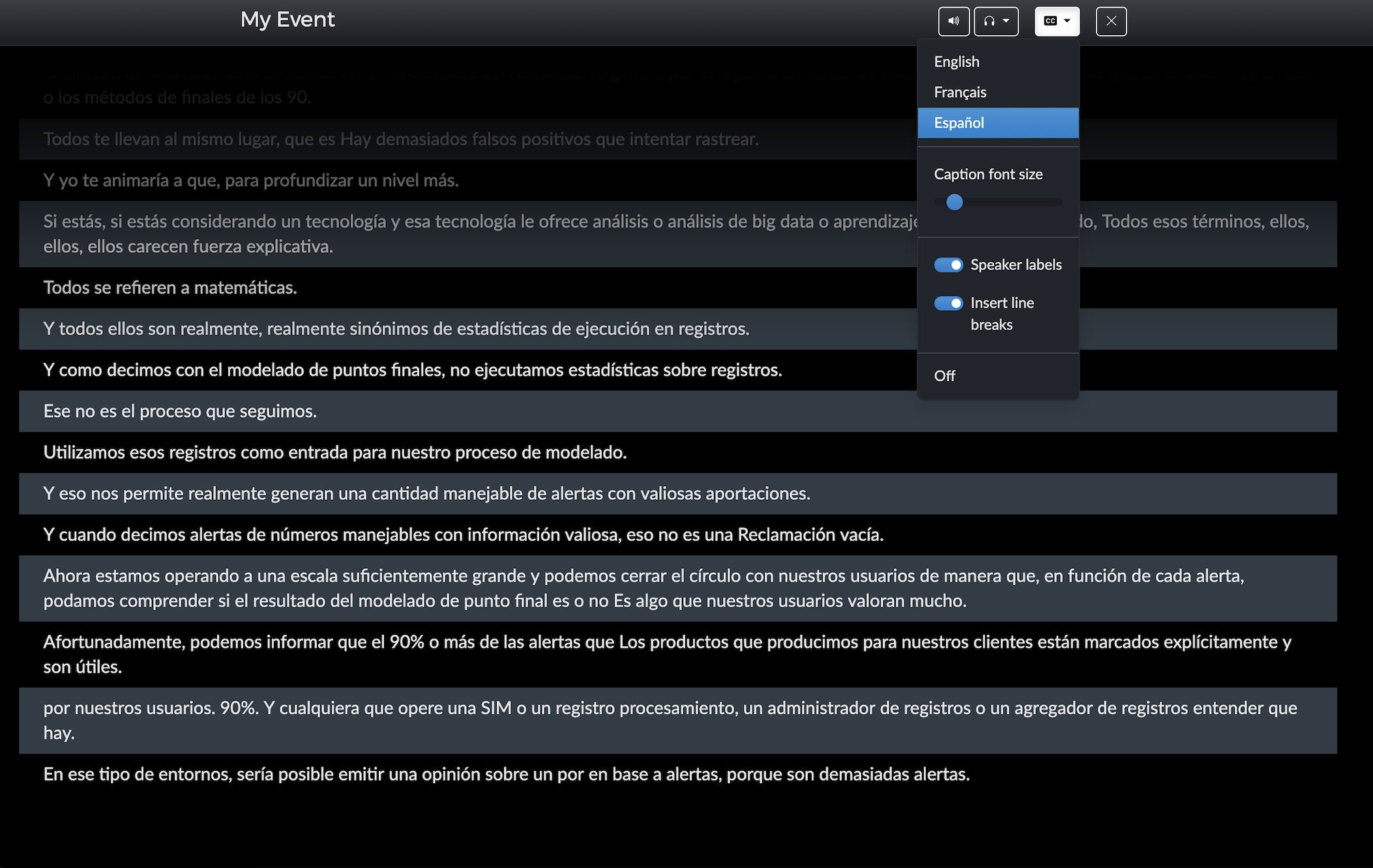
The interface for participants with Spanish translation
Why choose Clevercast On-Site?
Accuracy, without compromising on speed
Real-time speech translation is a balancing act: the less time AI has to process incoming speech, the harder it becomes to deliver accurate results.
That’s why Clevercast goes beyond standard real-time AI processing. Our technology makes the most of every available second, combining carefully optimized processing with advanced AI models to deliver highly accurate transcripts and natural-sounding translations – while keeping delays to a minimum.
Intelligent processing at every step
- More accurate transcripts. We use a carefully optimized processing window to give AI more context, improve punctuation and make the best use of your vocabularies and detected speaker information.
- Better translations. Our translation engine uses your vocabularies and additional context to preserve terminology, meaning and consistency across languages.
- More natural speech. AI-generated voices adapt to speaker changes and use intelligent timing to make translated speech sound more natural and conversational.
We continuously select and optimize the AI technologies best suited to the languages and content of each event. The result is a real-time solution designed not just for speed, but for accuracy and quality.
Customize Application Behaviour
Extensive feature set
Clevercast On-Site is a web application for AI speech transcriptions and translations in real-time, delivering text and audio to event audiences without latency. It offers numerous features designed to simplify usage, enhance accuracy, and tailor operations to your specific event. If you are looking for particular features, we would be happy to work with you.
On-site transcriptions and translations are also available with our AI Multilingual plan, where they can be combined with live video streaming.
130 languages and dialects
Reach participants across language barriers with support for 130 languages and dialects. Offer AI-generated transcripts, text translations and spoken audio translations in a wide range of languages, with regional voice variations available for selected languages.
Custom Vocabularies
Add names, company names, abbreviations and industry-specific terminology to a custom vocabulary. Clevercast uses these terms to improve speech recognition, spelling and translations, helping your audience receive more accurate results.
Speaker Detection
Clevercast can automatically recognize speakers and identify them by name in live transcripts. In audio translations, each speaker is represented by a distinct AI voice, making conversations easier to follow.
Brandable web application
Customize the appearance of your On-Site experience to better match your event or organization. You can use your own images and messages on the participant landing page and during event states such as Preview, Paused or Ended.
Configurable Delay
Adjust the processing delay to suit your event. A shorter delay delivers transcripts and translations faster, while allowing AI more time to process the speech can improve accuracy and readability.
Multilingual events & language detection
Clevercast supports events where speakers alternate between different languages. The spoken language can be detected automatically or changed manually, allowing transcripts and translations to follow the conversation.
Support for large screens
Display automatically scrolling live transcripts on large screens throughout your venue. Dedicated production links let your team customize text size, colors and background, with a full-screen mode for a clean, distraction-free display.
Get Started Now
Start live streaming today with a solution of choice. No credit card required.
Or contact us for more info.